Line Cards
Line cards turn a whole note into flashcards — every line becomes its own scheduled card, with no fences and no duplicate authoring. Osmosis tags eligible lines with native Obsidian block IDs, and each tagged line is scheduled by FSRS like any other card: the front is the line's place in the note's structure, the back is the line itself.
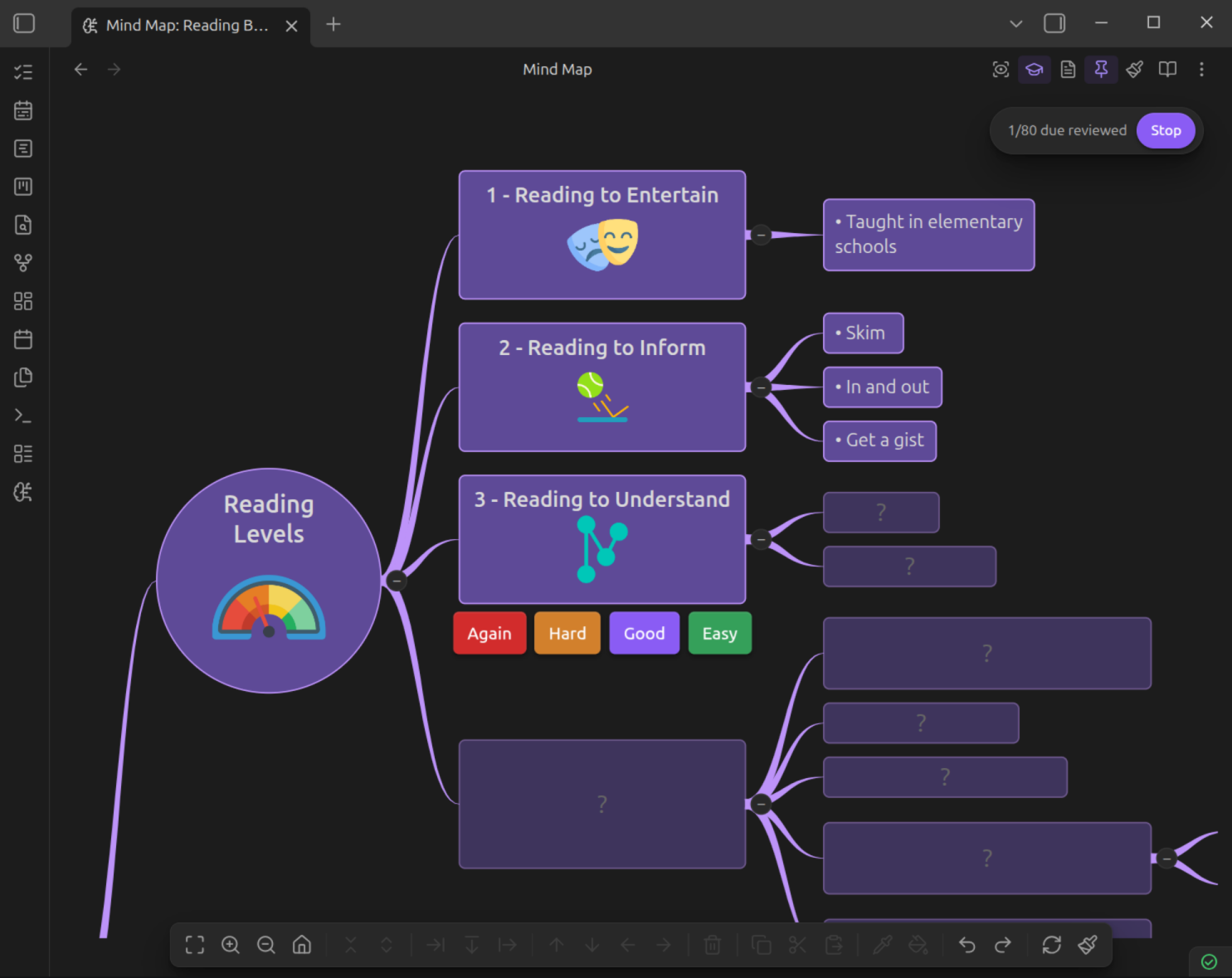
Generating Line Cards
Run Generate flashcards from note from the command palette, or right-click a note and choose Generate flashcards.
Osmosis scans the note and shows a confirmation modal listing the lines that will be tagged. Nothing is written until you confirm; the change is a single edit, so one undo reverts it.
- Eligible lines are the same elements that become mind map nodes: headings, bullet items, numbered items, and paragraphs.
- Skipped: frontmatter, code fences (including
osmosisfences — those are already cards), blank lines, and anything under<!-- osmosis-exclude -->. - If the note isn't opted in yet, the modal notes that
osmosis-cards: truewill be added to its frontmatter. - Re-running the command is incremental — it only tags new, untagged lines. Existing IDs (and their scheduling history) are untouched.
Block IDs
Each tagged line ends with a block ID of the form ^os- plus six characters:
Block IDs are native Obsidian syntax:
- Invisible in reading view — Obsidian hides them natively (they appear dimmed in live preview and source mode).
- Linkable —
[[note#^os-a1b2c3]]deep-links straight to the line. - Stable — the ID travels with the line through edits, reorders, and renames, so scheduling history survives.
If a line already carries a block ID you added yourself, Osmosis reuses it instead of adding a second one.
Multi-Line Blocks
Code blocks, tables, and callouts/blockquotes are single units, so they get a single identity:
osmosisfences use their existingid:metadata key (added if missing).- Generic code blocks, tables, and callouts/blockquotes get a standalone
^os-xxxxxxline immediately after the block — Obsidian's native way to block-reference multi-line content.
An image on a line can carry occlusion masks: right-click it, draw, and the line becomes one card per mask group. Osmosis tags the line and opts the note in for you — see Image Occlusion.
A callout or blockquote is one card, not one card per line. A run of consecutive >-prefixed lines — title, body, and any nested list — is a single block:
> [!tip] Bloom the grounds
> Pour twice the coffee's weight in water and wait 30 seconds
> before the main pour.
^os-a1b2c3
A blank or non-> line ends the run, so two callouts back to back stay two separate cards. The generation modal labels these Callout / quote.
Per-Node and Per-Selection Control
Generate flashcards from note is the bulk, all-or-nothing pass. Once a note has line cards, you can adjust individual lines without re-running it.
Add and Remove
| Where | How |
|---|---|
| Editor | Select one or more lines, then run Add line cards from selection / Remove line cards from selection from the command palette |
| Editor | Select lines, right-click > Add line cards / Remove line cards |
| Mind map | Right-click a node > Add line card / Remove line card |
Add tags the selected lines with ^os- block IDs, exactly as bulk generation would. Remove deletes the block ID, which removes the card.
Removing IDs you wrote yourself
Remove also deletes block IDs you authored (^my-anchor), not just Osmosis's ^os- ones. Because other notes may link to them, Osmosis confirms first and tells you which links would break.
Selecting a run of plain prose and adding line cards splits it into one block — and one card — per line, inserting the blank lines that make each line its own block. This matches how the mind map saves, so the two views agree.
Exclude from Study
Sometimes a line shouldn't be studied right now, but you don't want to lose its history. Exclude pauses the card:
| Where | How |
|---|---|
| Editor | Ctrl+P > Exclude line cards in selection from study / Include line cards in selection in study |
| Mind map | Right-click a node > Exclude from study / Include in study ( / ) |
| Sequential study | The exclude button on the study modal |
An excluded card is out of study everywhere — it isn't hidden in peek or study on either surface, it's skipped by the sequential queue, and it's dropped from dashboard counts. Its FSRS history is preserved, so including it again resumes where it left off.
Exclusion is stored as disabled: true on the card's osmosis-schedule entry:
Schedule and exclusion are tracked independently: rating a card never clears the flag, and including a card never wipes its schedule. A line you've excluded but never studied gets a schedule-less stub entry.
Exclude vs. remove vs. opt out of decks
Exclude pauses one card but keeps its history. Remove deletes the block ID, and with it the card. osmosis-line-cards: false keeps a note's cards out of decks and sequential study while leaving them studiable in place.
Card Anatomy
A line card asks: given where this line sits in the note, what does it say?
- Front — the ancestor breadcrumb (
Coffee Brewing › Pour Over › ?), plus up to N immediately preceding sibling lines for context in sequential study (Settings > Osmosis > Line card context lines, default 2). - Back — the line itself, rendered as markdown.
- Identity —
note path#^blockId, stable across edits and reorders.
Scheduling Data
Line card schedules live in the note's frontmatter under osmosis-schedule, keyed by block ID:
---
osmosis-cards: true
osmosis-schedule:
  os-a1b2c3:
    due: 2026-07-22T10:30:00
    stability: 4.2
    difficulty: 5.1
    lastReview: 2026-07-15T09:12:00
    reps: 3
    lapses: 0
    state: review
    learningSteps: 0
---
The key is written lazily — only after the first review, not when IDs are generated. Writes are debounced and coalesced, so rating a run of cards produces one file write, flushed at session end. See Data Storage for the full format.
Studying Line Cards
Line cards work in all three study modes:
- Sequential — drawn from decks like any other card; the front shows the breadcrumb and context lines.
- Contextual — Peek and Study modes in reading view hide and reveal lines in place.
- Spatial — due lines hide behind
?placeholders on the mind map; reveal and rate without losing the map's structure.
Decks & Opt-Out
Line cards count toward deck totals and appear in sequential study by default. Deck assignment follows the note (osmosis-deck frontmatter or folder path).
To keep them out of decks while still studiable in place (peek/study/spatial):
- Per note: add
osmosis-line-cards: falseto the frontmatter. - Globally: turn off Settings > Osmosis > Include line cards in decks.
Deleting Lines & Orphans
Deleting a line (or just its block ID) soft-deletes the card: the schedule entry stays in osmosis-schedule, and if the ID reappears the card re-links with its history intact.
The card browser deletes a line card the same way — by stripping its block ID. Your prose is never touched.
Bonus: Stable Styling Anchors
Block IDs double as mind map style selectors. A node tagged ^os-a1b2c3 can be styled with that key in osmosis-styles — unlike tree-path selectors, it survives renames and reorders.